How to market your product to businesses
A practical, step-by-step method for founders who sell a product to other businesses: choose one segment, find the businesses in it, decide which ones fit, send a short personal message and follow up. Every step is shown with real screenshots, in the browser and from an AI assistant connected through MCP.
The short answer
To market a product to businesses when you are starting out, talk to the businesses it is for, one segment at a time:
- Pick one segment you can name: a type of business in a place.
- Count the businesses in your segment. Check how many businesses match before you spend anything on research.
- Review each business and decide whether it fits. Open the results a page at a time, check websites where it helps, and keep only the businesses that fit.
- Keep your leads in one list with stages. Save the ones that fit to a list where every lead has a stage, tags and a follow-up date.
- Describe your offer once, then write a template. Write one or two sentences about what you offer and turn them into a short template.
- Personalize each message and send it yourself. Adapt the template to each business and send it from your own mailbox or phone.
- Give every lead a next step. Log each contact and set the date and the action for the next follow-up.
- Work your follow-ups from Today. Follow up on schedule and compare replies between lists to see which segment works.
Why start with direct outreach
Ads, content and SEO all work better once you know who buys and why. Before that, they are expensive ways to guess. Writing to businesses that look like a fit is slower per contact, but every reply teaches you something: whether the problem is real, how customers describe it, and what makes them say no.
This guide follows one example from start to finish. Giulia has built Agendo, an online booking app for beauty salons, and wants her first customers in Milano. Giulia and Agendo are made up; the businesses in the screenshots are real records from the IperContent catalog, with their contact details blurred.
Before you start: pick one segment you can name
A segment is a type of business in a place, such as beauty salons in Milano or dental clinics in Leeds. It should be small enough to review by hand, and the businesses in it should share the problem your product solves. Good first segments are businesses that:
- do the thing your product helps with every day, such as taking appointments;
- you can recognize from public information, such as a listing or a website;
- you could actually serve if they said yes tomorrow.
| If you sell | Start with |
|---|---|
| An appointment booking app | Beauty salons, barbers or physiotherapists in one city |
| Website or local SEO services | Restaurants or tradespeople with no website listed |
| A point-of-sale or ordering tool | Cafés and bakeries in one district |
| An AI phone receptionist | Dental clinics or veterinary practices in one city |
| Bookkeeping software | Small accounting firms in one region |
If you are unsure, choose the segment where you can explain the benefit in one sentence. You can test a second segment later and compare the two.
Step 1Count the businesses in your segment
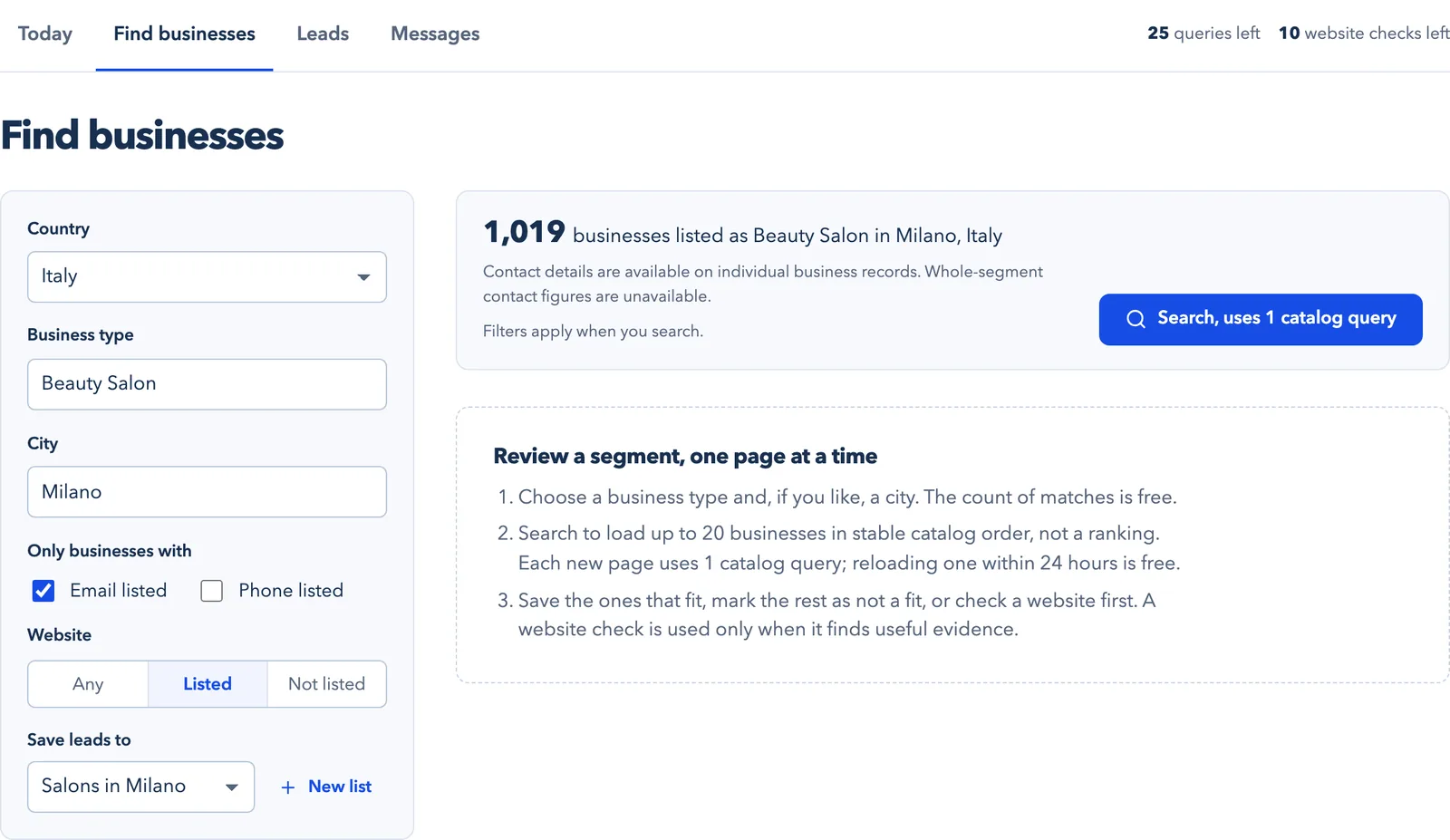
In Find businesses, choose the country, the business type and, if you like, a city. The number of matching businesses appears straight away and costs nothing, so you can try a few combinations before you search. Giulia’s segment has 1,019 businesses listed as beauty salons in Milano.
Filters narrow the search to businesses with an email or a phone number listed, or with or without a website listed. They apply when you search. Then choose the list your leads go to; Giulia created one called Salons in Milano.
 (open the full-size screenshot)
If the count runs into thousands, narrow the business type or the area. If it is only a handful, widen the area. Aim for a segment you can review in a few weeks.
Step 2Review each business and decide whether it fits
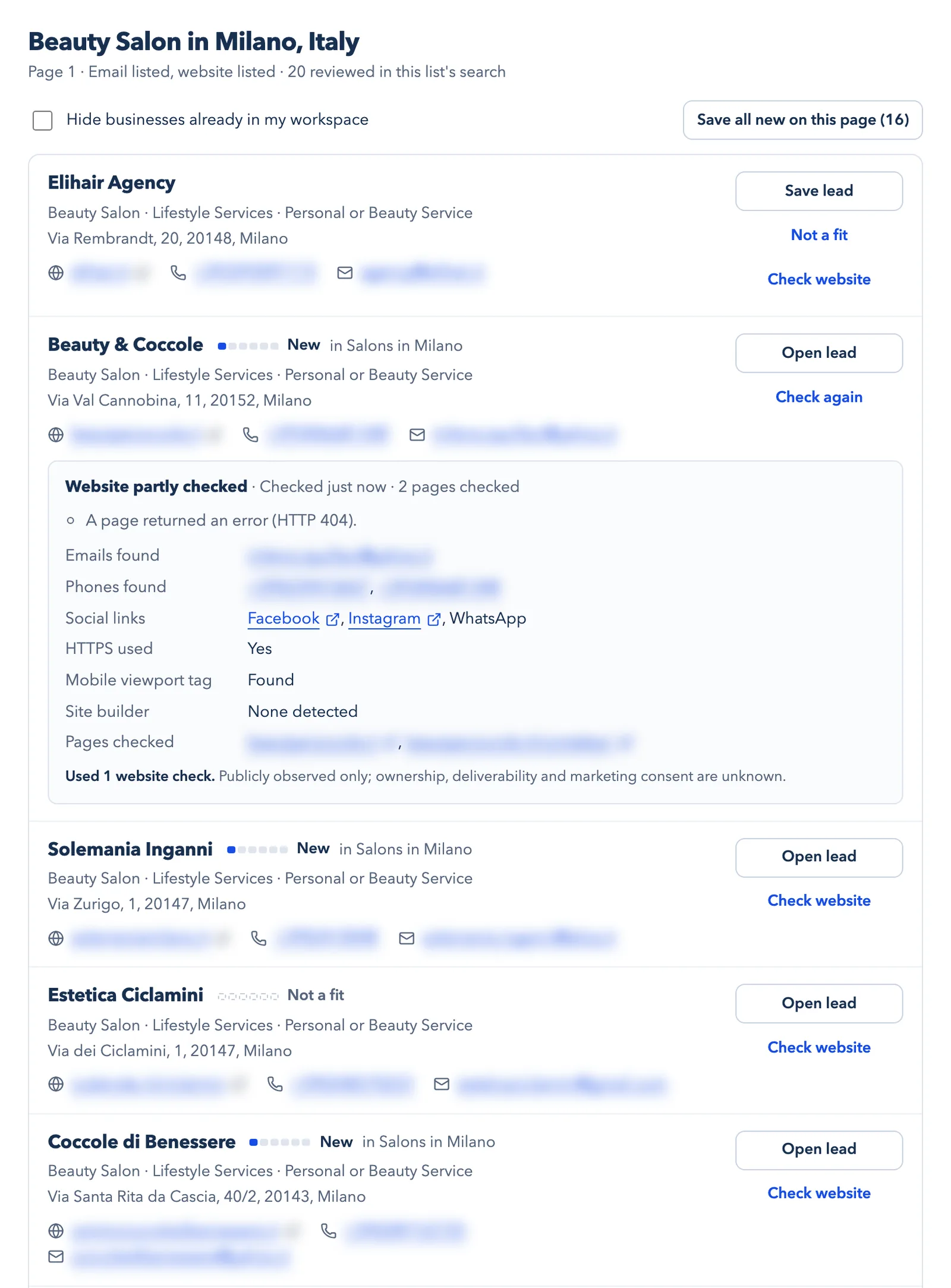
A search loads up to 20 businesses at a time, in stable catalog order rather than a ranking. For each one, choose Save lead, Not a fit or Check website. Saved businesses join your list as new leads.
A website check reads up to three public pages of the business’s own website and reports what it observed: whether the site uses HTTPS and has a mobile viewport tag, the site builder if one is detected, and the public email addresses, phone numbers and social profiles it found. It uses one website check from your allowance only when it finds useful evidence.
 (open the full-size screenshot)
What to look for
- Signs that they do what your product helps with. For Giulia, appointments.
- Independent businesses rather than chains that buy centrally.
- Signs that they already use an alternative, such as a booking provider. That can mean not a fit, or a different message.
- A way to reach them that you would be comfortable using.
A listing does not tell you who wants to buy, and listed contacts are not verified decision-makers. Treat every lead as a guess until they reply.
Step 3Keep your leads in one list with stages
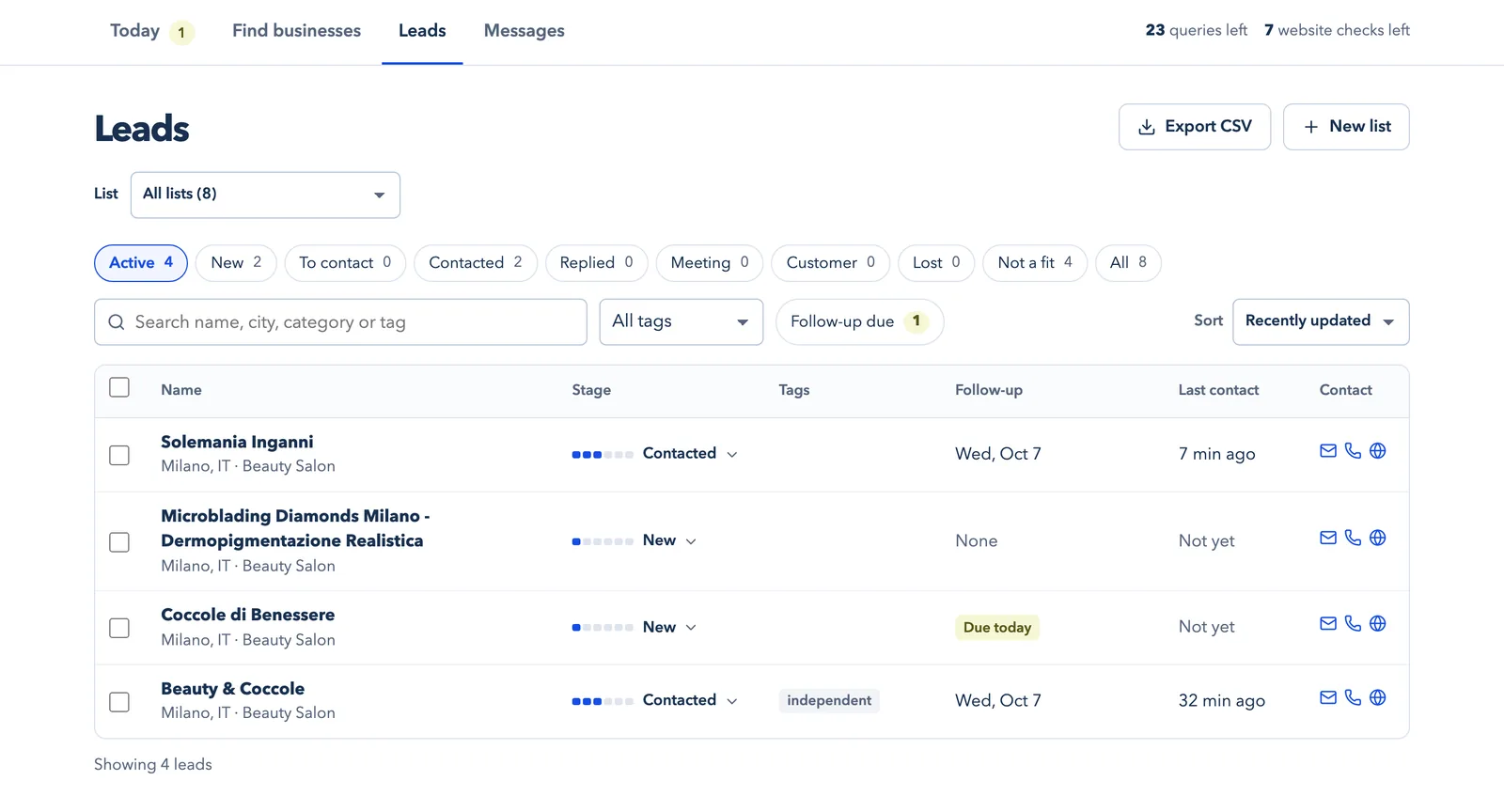
Every saved business becomes a lead with a stage: New, To contact, Contacted, Replied, Meeting and Customer, plus Lost and Not a fit. Tags, follow-up dates and your last contact sit in the same table, so you can see at a glance who needs what.
 (open the full-size screenshot)
You can export your leads to a CSV file at any time. The workspace itself is free; only searches and website checks use your research allowance.
Step 4Describe your offer once, then write a template
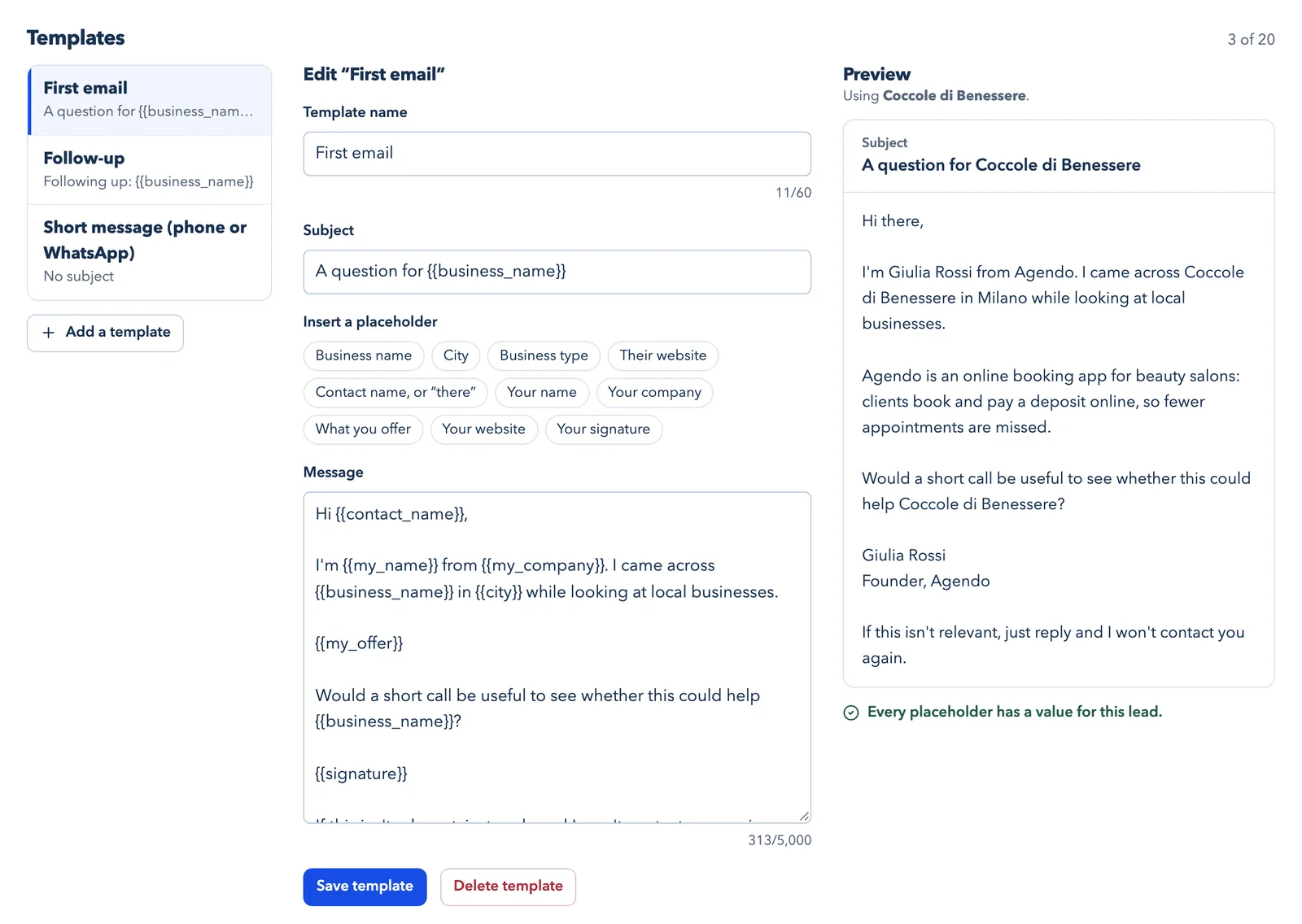
Under Messages, fill in About you: your name, your company, one or two sentences on what you offer, your website and your signature. Templates use placeholders such as the business name and the city. The preview fills them in with one of your saved leads, so you can check the result before you use it.
 (open the full-size screenshot)
How to write a first message that gets read
- Say who you are and how you found them, in one line.
- Say what your product does for businesses like theirs in one sentence, with a concrete result.
- Ask one easy question, such as whether a short call would be useful.
- Keep it short enough to read on a phone.
- Make it easy to say no, and respect the answer.
Step 5Personalize each message and send it yourself
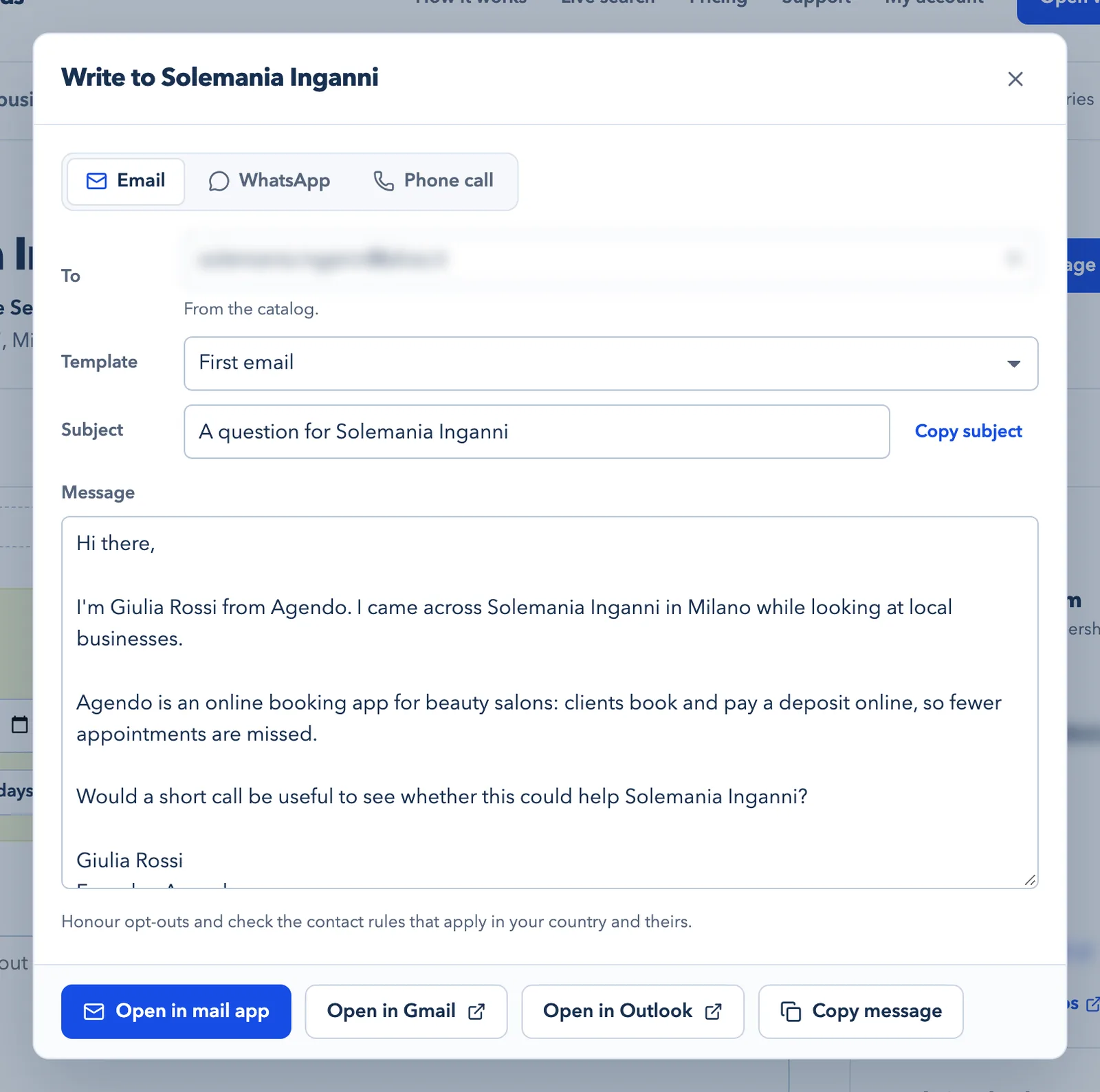
Open a lead and choose Write message. Pick email, WhatsApp or a phone call, and the template fills in for that business. Change anything that does not sound like you, then open the message in your mail app, Gmail or Outlook, or copy it.
IperContent never sends messages for you. Sending from your own mailbox means replies come straight to you, and you decide what goes out and when. Once it is sent, choose Log contact.
 (open the full-size screenshot)
Step 6Give every lead a next step
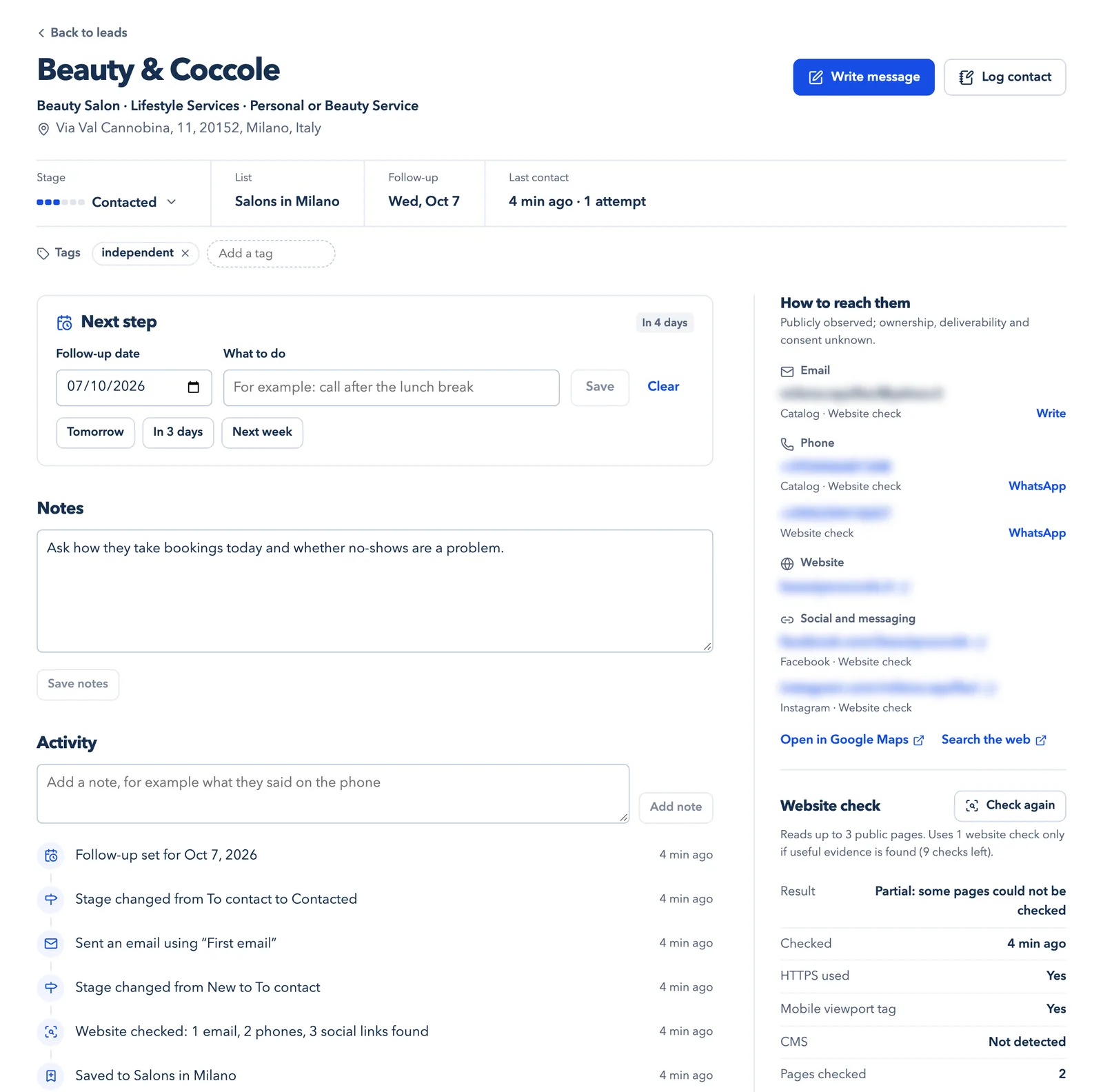
Logging a contact moves the lead to Contacted and sets a follow-up date, four days later unless you change the default. You can pick another date, write what to do next, add tags and notes, and read the lead’s history under Activity: when it was saved, checked, contacted and moved between stages.
 (open the full-size screenshot)
Step 7Work your follow-ups from Today
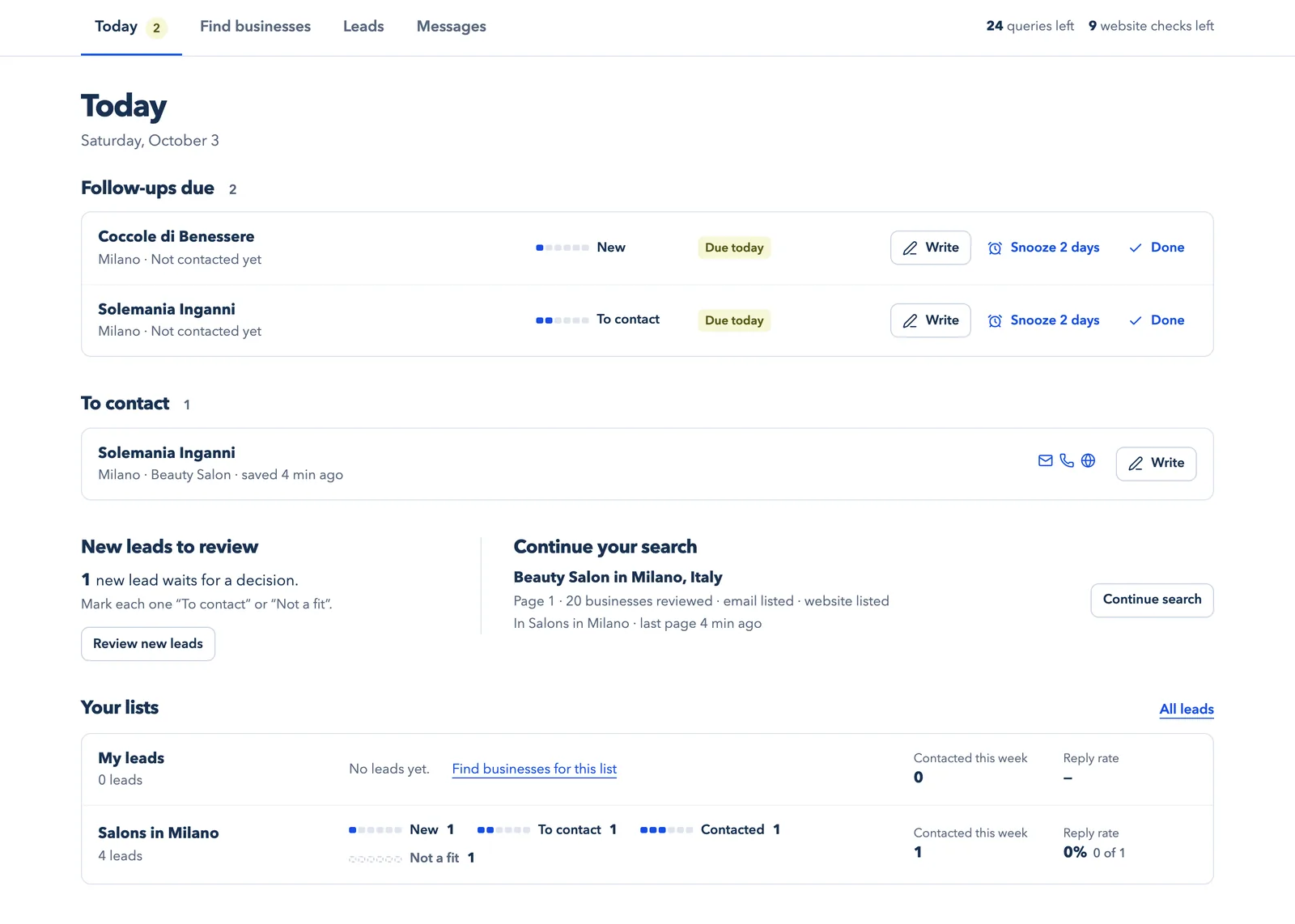
Today lists the follow-ups that are due, the leads you marked To contact, new leads waiting for a decision and the search you can continue. For each list it also shows how many leads you contacted this week and how many replied.
 (open the full-size screenshot)
A short, polite follow-up a few days later often gets the reply the first message did not. Stop after one or two follow-ups, and stop at once if someone says no. There are no automatic sequences or reminder emails: Today is where you see what is due.
Do the same work from ChatGPT, Claude or Claude Code (MCP)
IperContent Leads is also an MCP server. MCP, the Model Context Protocol (opens a new tab), is an open standard that lets AI applications use outside tools. Once you connect it, your AI can search the catalog, check websites and read or update your workspace when you ask, using the same allowance as the browser. It cannot delete anything, export your workspace or send messages. Your AI application may need its own paid plan.
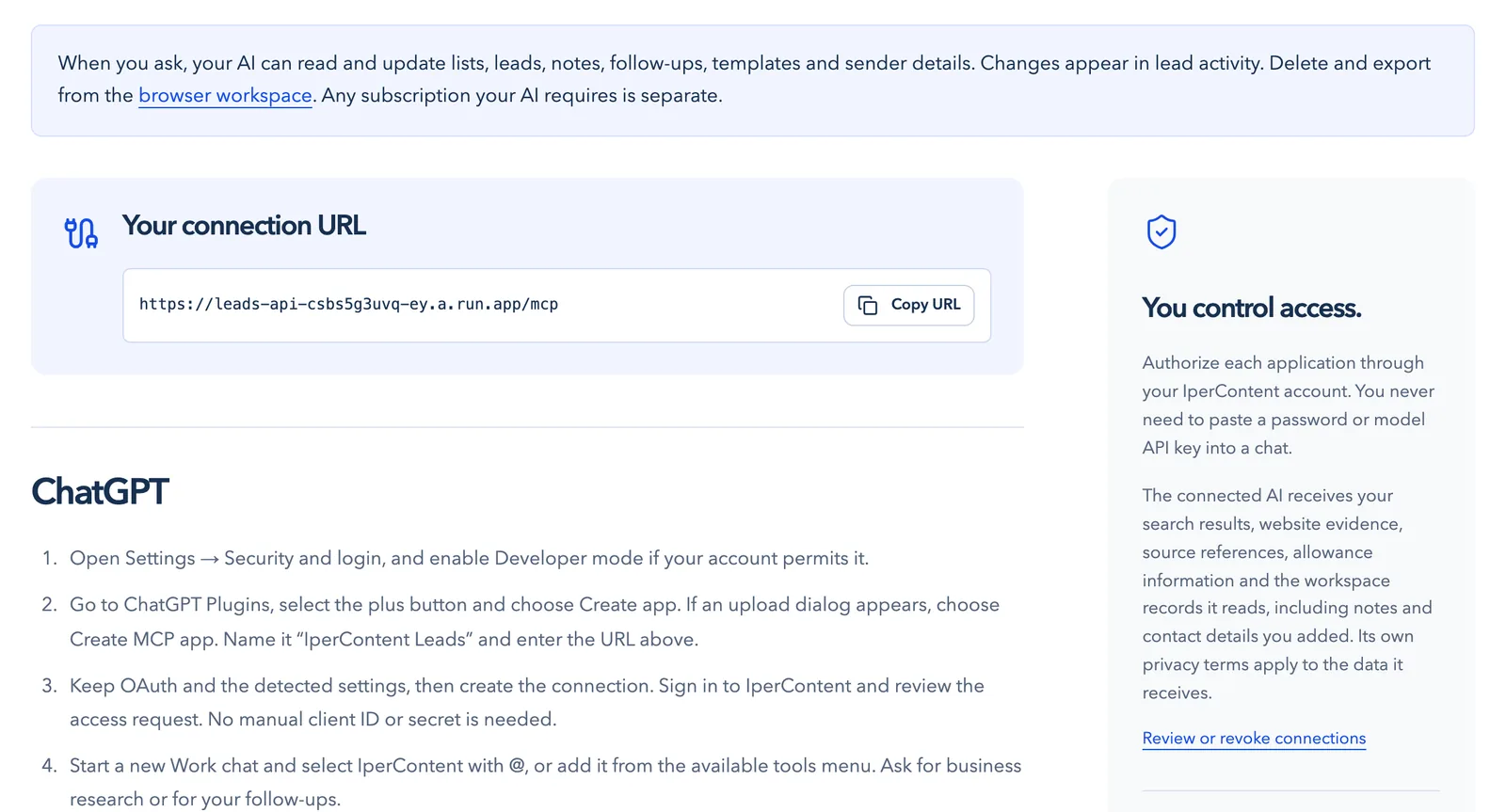
1. Copy your connection URL
Connect your AI shows your connection URL and the setup steps for ChatGPT, Claude, Claude Code and other MCP clients. In Claude Code it is one command, copied from that page, followed by /mcp to sign in.
 (open the full-size screenshot)
2. Approve the connection
Your AI application opens IperContent in your browser. Sign in and review what the connection can and cannot do. You never paste a password or an API key into a chat.
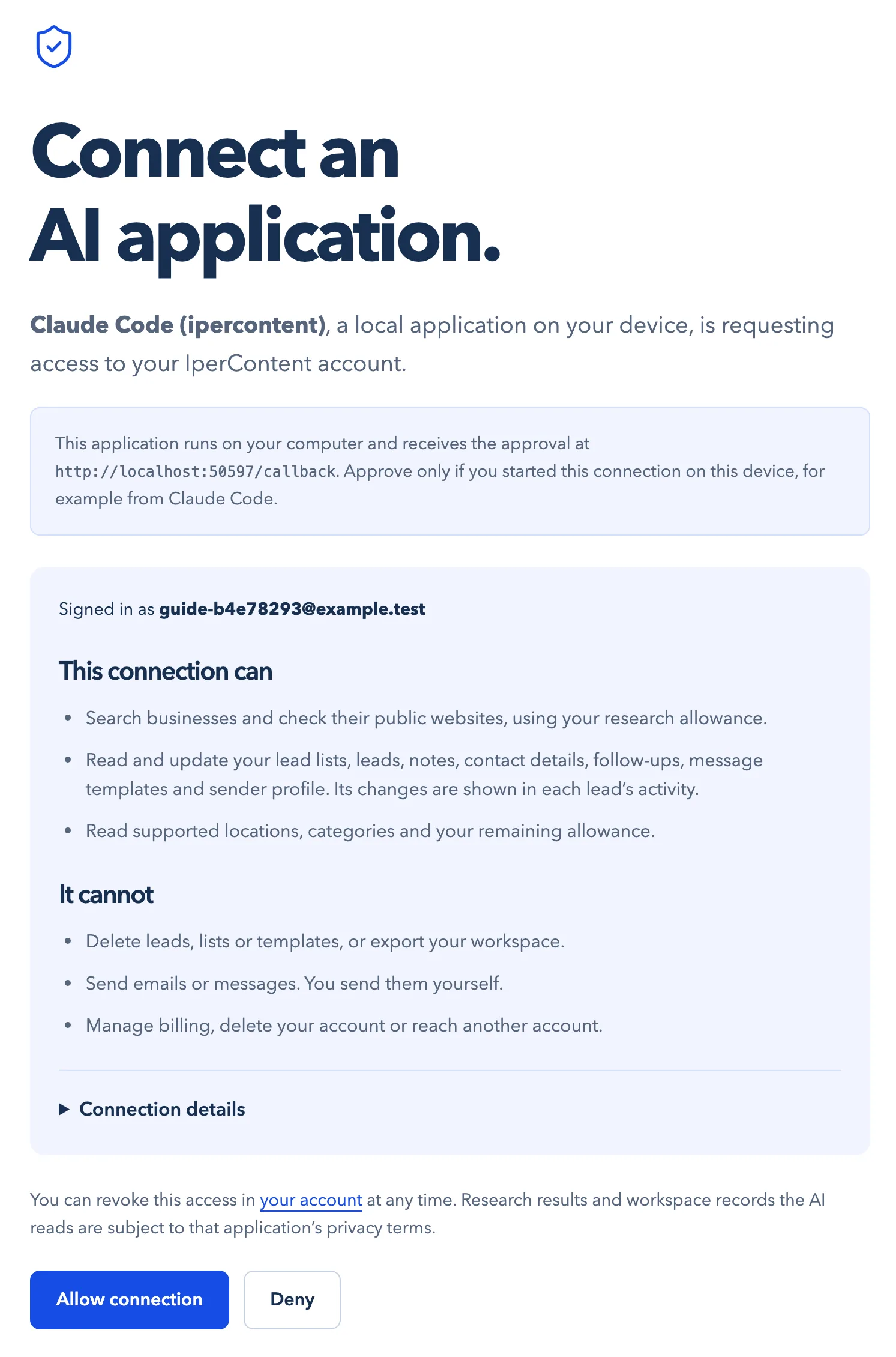 (open the full-size screenshot)
3. Ask for research in plain language
Ask the way you would ask a colleague. Here, Claude Code continues the saved search for Salons in Milano, checks four websites, saves the salon that fits and marks the others as not a fit, with a note on each.
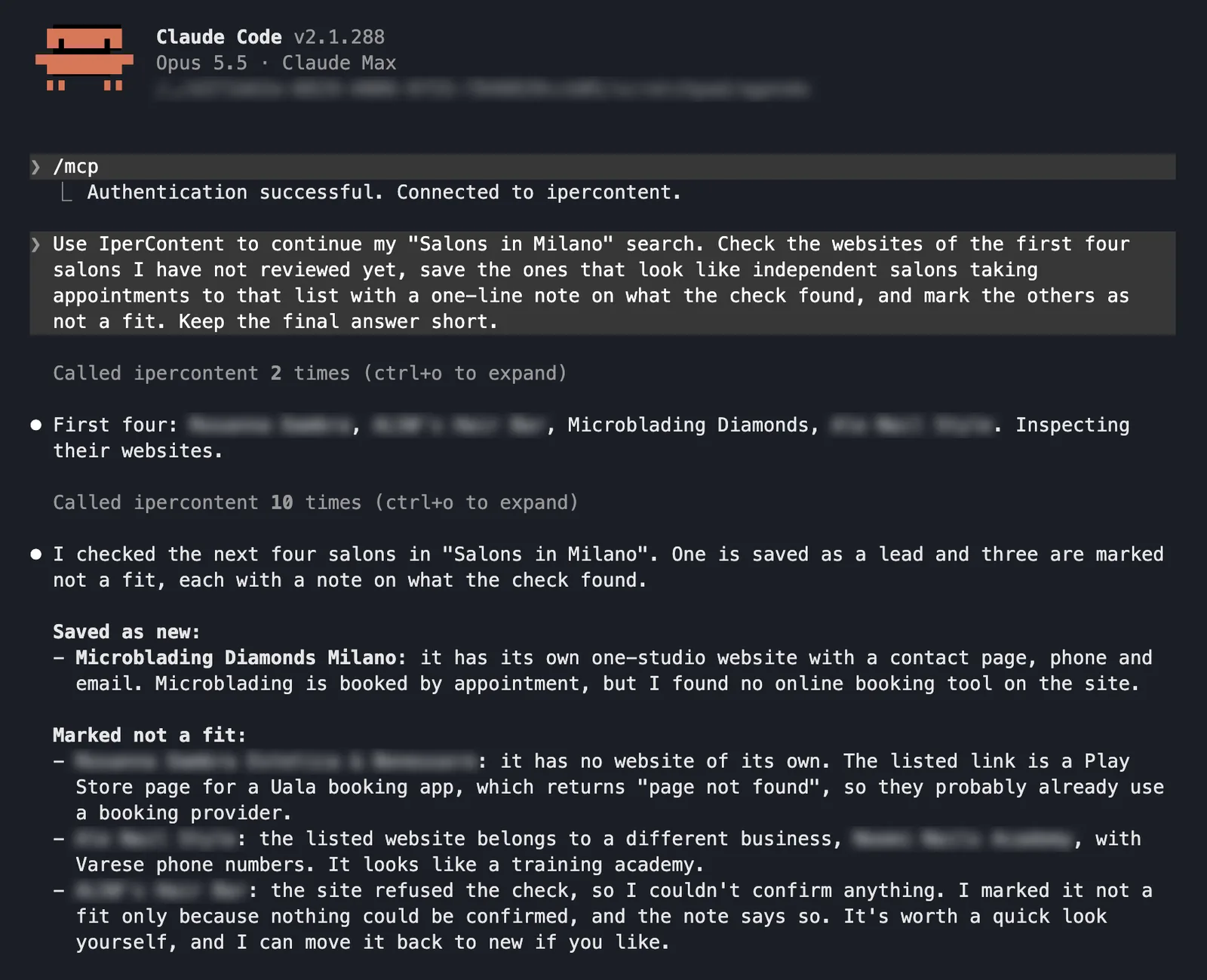 (open the full-size screenshot)
4. Let your AI prepare the day’s follow-ups
Your AI can tell you what is due and draft a message from your own template. When you say you have sent it, it logs the contact and sets the next follow-up. It never sends anything, and it logs only the contacts you confirm.
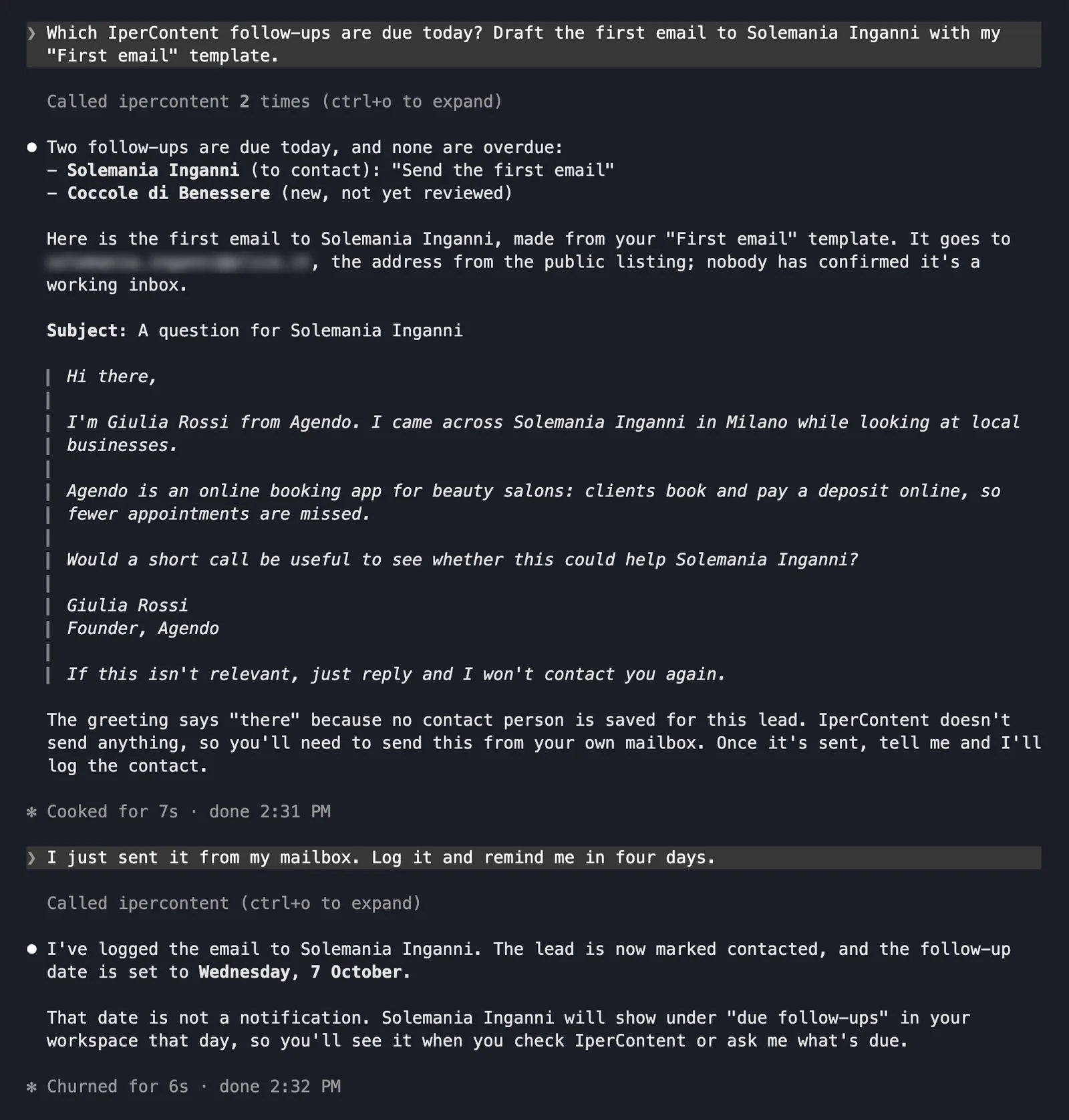 (open the full-size screenshot)
5. See what your AI changed
Every change an AI makes appears in the lead’s activity with the name of the application, so you can always see what happened.
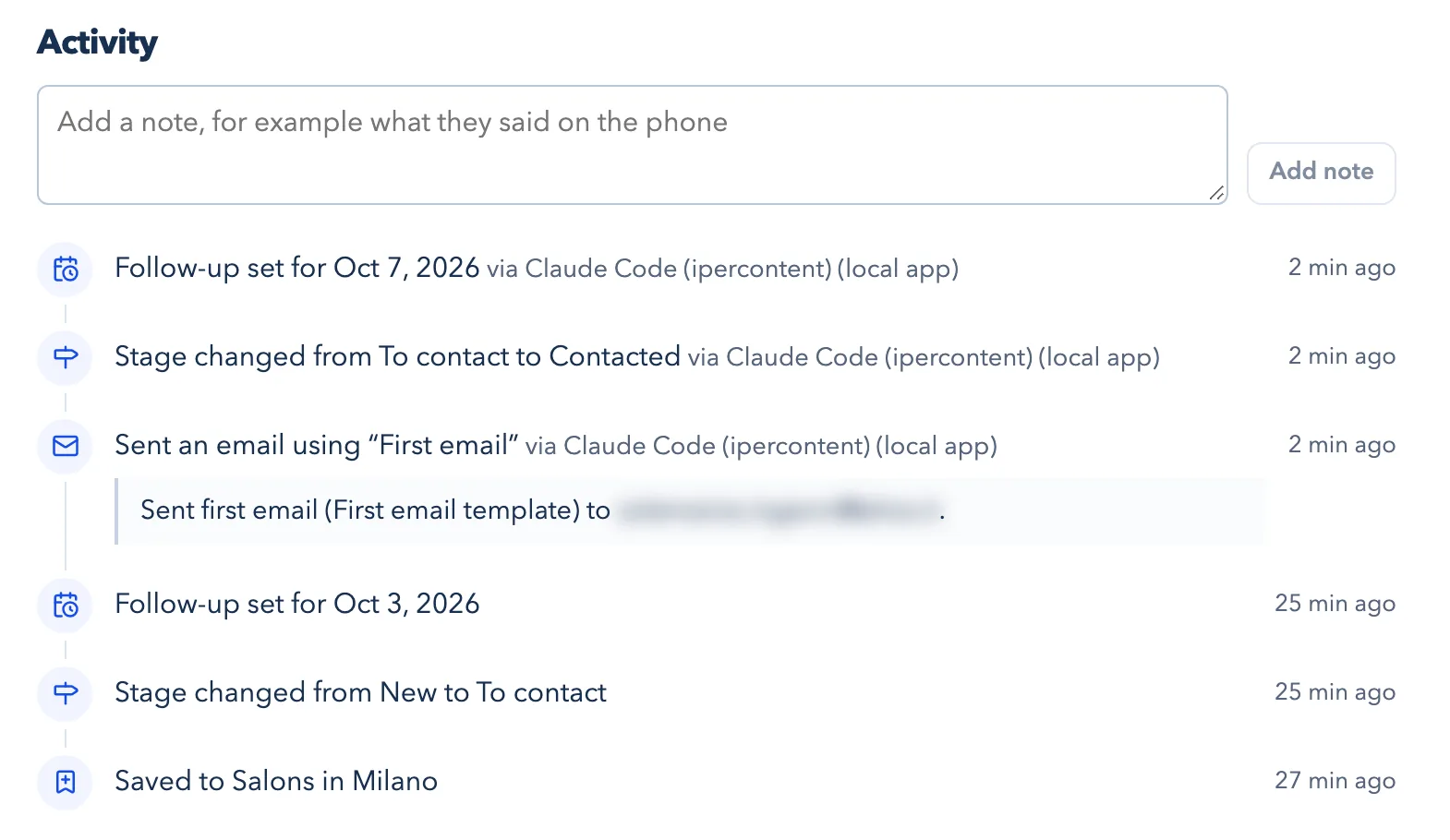 (open the full-size screenshot)
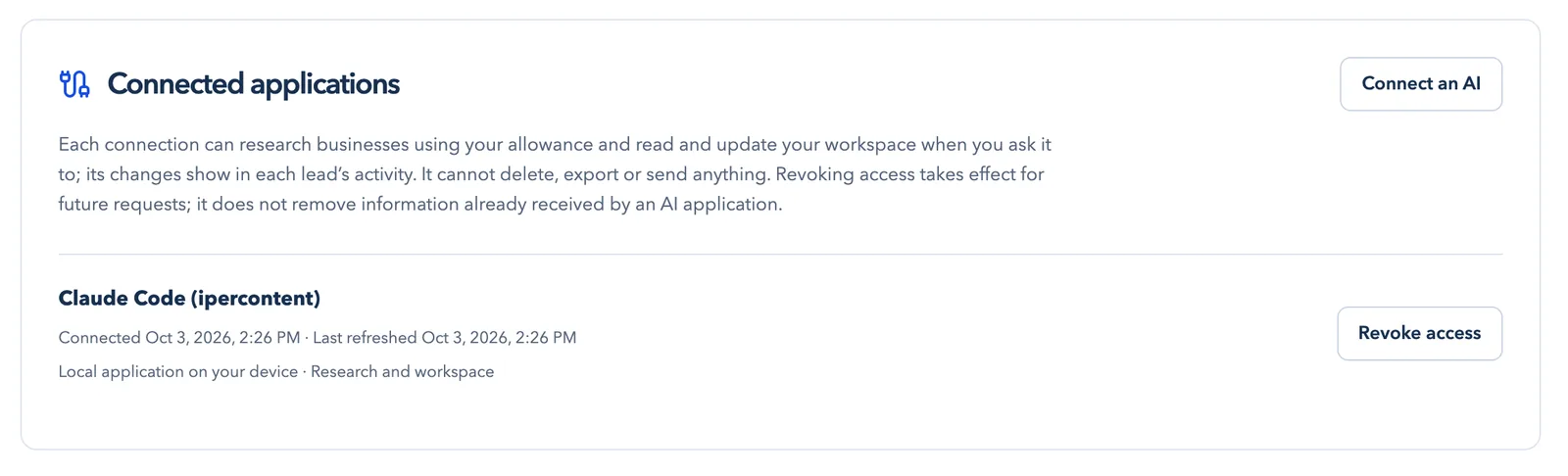
6. Review or revoke access
Your account lists every connected application. Revoking access stops its future requests.
 (open the full-size screenshot)
Prompts to try
- “Find web design studios in Portland, United States, with an email listed. Check their websites and save the promising ones to my outreach list.”
- “Continue my Salons in Milano search from where I stopped.”
- “Which follow-ups are due today? Draft each one with my Follow-up template.”
- “I just called Studio X and they asked me to write again next month. Log the call and set the follow-up.”
Name the country when you search. Searches and website checks use your allowance; saving and updating leads is free.
Contact rules and good manners
The rules for contacting businesses differ by country, and often by whether the business is a company or a sole trader. The EU’s GDPR and ePrivacy rules, the UK’s PECR and the US CAN-SPAM Act are common starting points; check the rules that apply in your country and in theirs. This guide is not legal advice.
- Say who you are and where you found their details.
- Make it easy to opt out and honor it straight away. Mark the lead Do not contact so it stays out of your messages and follow-ups.
- Write each message yourself, and send only as many as you can follow up.
- Contact details in public listings can be out of date or belong to someone else, so check before you write.
Measure what is working
Judge a segment by its replies, not by how many messages you sent. Today shows, for each list, how many leads you contacted this week and how many replied. If a segment stays quiet after a fair number of messages, change one thing at a time: the segment, the sentence that describes your offer or the question you ask. Keep segments in separate lists so you can compare them.
Frequently asked questions
What is the best way to market a new product to businesses?
When you are starting out, contact a small, well-defined group of businesses directly. Pick one segment, write a short personal message to the businesses that fit, follow up once or twice and learn from the replies. Ads, content and SEO work better once you know who buys and why.
How do I find my first customers for a B2B product?
Start from businesses filtered by type and location, check each one before you write, and contact only those that fit. IperContent Leads gives you a worldwide catalog of licensed business listings and a free count for any segment. Coverage varies by country and sector.
How many businesses should I contact each day?
As many as you can personalize and follow up properly. For many founders that is between five and twenty new messages a day, plus follow-ups. Increase the number once your message gets replies.
Is it legal to email businesses I find in a public listing?
It depends on the country and on whether the business is a company or a sole trader. Say who you are, explain where you found their details, offer an easy opt-out and honor it. Check the rules that apply in your country and in theirs; this guide is not legal advice.
Can ChatGPT or Claude find customers for me?
Connected through MCP, ChatGPT, Claude or Claude Code can search the IperContent catalog, check websites and update your lead lists when you ask. You decide which businesses fit, and you send every message yourself.
Does IperContent send emails or follow-ups for me?
No. You send messages from your own mailbox or phone. IperContent prepares them from your templates, keeps the history and shows on Today which follow-ups are due. It does not run sequences or send reminders.
Are the contact details verified?
No. They come from the catalog or from a business’s public website. Ownership, deliverability and marketing consent are unknown, and a listing says nothing about whether a business wants to buy.
How much does it cost to start?
Creating an account is free and needs no card. Your workspace is free; searches and website checks use a research allowance. New accounts receive a free allowance once, and you can buy a research pack or a monthly allowance later.
Try it on your own segment
Check how many businesses match your segment for free, then save your first lead and give it a next step.
The screenshots were taken on October 3, 2026 with a demo account. Agendo and Giulia Rossi are fictional. The business records come from the IperContent catalog, built from Overture Maps Foundation data (release 2026-09-23.0); see coverage and sources. Contact details, and the names of businesses an AI marked not a fit, are blurred. Claude Code is a product of Anthropic.